1800 121 5955
Key Takeaways
- UI UX prototyping is a business simulation that relocates product failure from post-launch engineering sprints to an early validation phase where changes cost hours instead of quarters.
- Match prototype fidelity to the risk you are reducing: low-fidelity wireframes for flow logic, high-fidelity Figma prototypes for behavioral usability testing, and coded prototypes for complex state management.
- 94.8% of websites have at least one detectable accessibility failure; testing contrast, screen-reader focus order, and ugly real-world data payloads during prototyping prevents costly post-launch retrofits.
- Validated interfaces built with Lean UX and iterative prototyping achieve measurable quality benchmarks, including System Usability Scale (SUS) scores up to 85.53 and PSSUQ satisfaction scores of 2.136.
- With 43.8% of designers spending over half their time using AI-generated code, explicit engineering handoff packages covering every state and conditional branch are vital to prevent sprint rework.
UI UX prototyping is the practice of building interactive, testable simulations of a digital product to validate workflows, usability, accessibility, and technical feasibility before production code is written. In 2026, the SaaS teams that survive their own roadmaps will not be the ones that code fastest—they will be the ones that validate earliest. Tools like Figma and AI-assisted code environments make it possible to put a realistic product experience in front of users and executives before committing engineering budget.
A feature that ships to production and then gets rolled back does not just cost you the sprint. It costs you the architectural decisions built on top of it, the support tickets, the customer retraining, and the boardroom credibility spent explaining why the quarter’s roadmap slipped. Rapid prototyping UX design does not eliminate product risk; it relocates that risk to a controlled moment when changing your mind costs hours instead of quarters.
The data backs up why validation cannot wait until post-launch QA: 94.8% of websites have at least one detectable accessibility failure, a risk far more expensive to retrofit than to design out during prototyping. Meanwhile, high-performing interfaces validated early can achieve System Usability Scale (SUS) scores as high as 85.53, and Lean UX methodologies in interface development have been shown to reach strong usability and satisfaction scores, including a PSSUQ of 2.136. With 43.8% of designers now spending more than half their time using AI-generated code, the distance between a product hypothesis and a testable prototype has never been shorter.
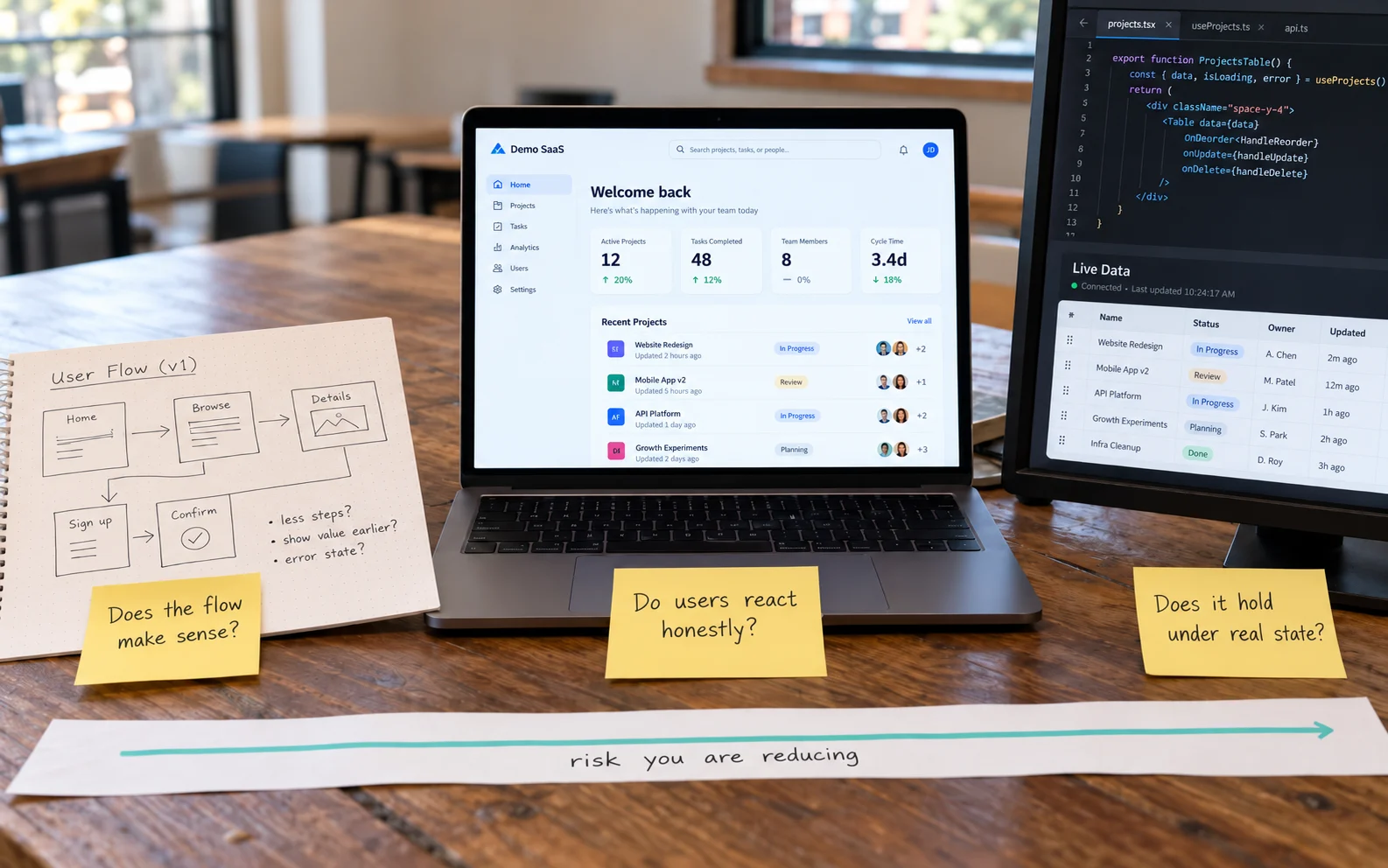
How do you choose the right prototype fidelity for your business objective?
Choose prototype fidelity based on the specific question you are trying to answer and the cost of being wrong, not on how impressive the artifact looks in a steering committee deck. The most common prototyping mistake in enterprise teams is over-investing in visual polish when flow logic is unresolved, or under-investing in interactivity when testing real user behavior.
| Prototype Type | Best For | Business Benefit |
| Low-fidelity wireframes | Early-stage flow logic, information architecture, navigation structure | Cheap to discard, which keeps teams emotionally detached from weak ideas |
| High-fidelity interactive (Figma) | Usability testing, stakeholder buy-in, visual system validation | Produces realistic user reactions and shortens executive approval cycles |
| Coded prototypes | Complex state management, performance-sensitive interactions, live data behavior | Surfaces technical constraints that frame-based design tools quietly hide |
Low-fidelity work is where you argue about whether a workflow makes sense at all; nobody defends a gray box too passionately, and that is the point. High-fidelity UI UX prototyping Figma workflows earn their keep when you need a user to forget they are looking at a mockup—realistic typography, spacing, and micro-interactions elicit behavioral honesty. Coded prototypes step in when frame-based tools start lying to you: drag-and-drop table reordering, real-time data refresh, or dense trading terminals require a thin coded slice to answer engineering feasibility and usability in the same pass.
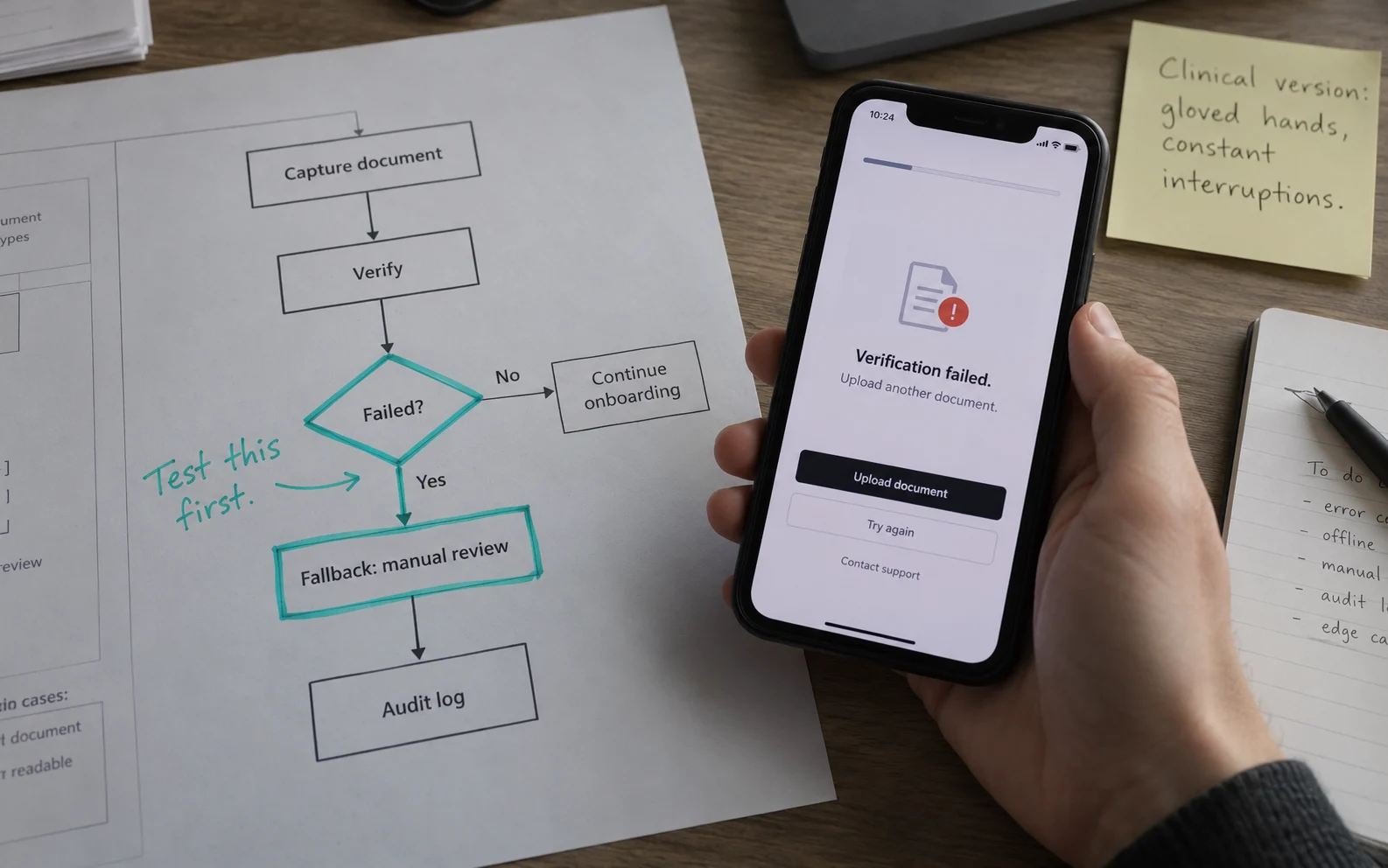
How does a research-first UX prototyping process work in BFSI and healthcare?
In regulated industries like BFSI and healthcare, a research-first UX prototyping process maps regulatory sequences, operational edge cases, and physical environment constraints before anyone opens a design file. A banking onboarding flow is not a UI problem until you understand the KYC sequence, document capture constraints, fallback paths for failed verification, and the on-demand audit trail required by compliance.
ScreenRoot begins by mapping the problem space through stakeholder interviews, workflow shadowing, and breakdown analysis before wireframing. From there, prototyping runs as an iterative loop:
- Build a narrow prototype around one hypothesis. Target the highest-risk workflow rather than boiling the ocean across the entire platform.
- Test with actual practitioners, including back-office operators. Run moderated sessions against the messiest edge cases first, where regulatory exposure and user frustration overlap—such as a global bank’s servicing console carrying decades of process logic or a clinical screen operated with gloved hands under constant interruption.
- Gate engineering commitment on objective usability scores. Instead of relying on the loudest opinion in a design review, hold prototypes against measurable benchmarks—such as achieving SUS scores up to 85.53—before engineering capacity is committed.
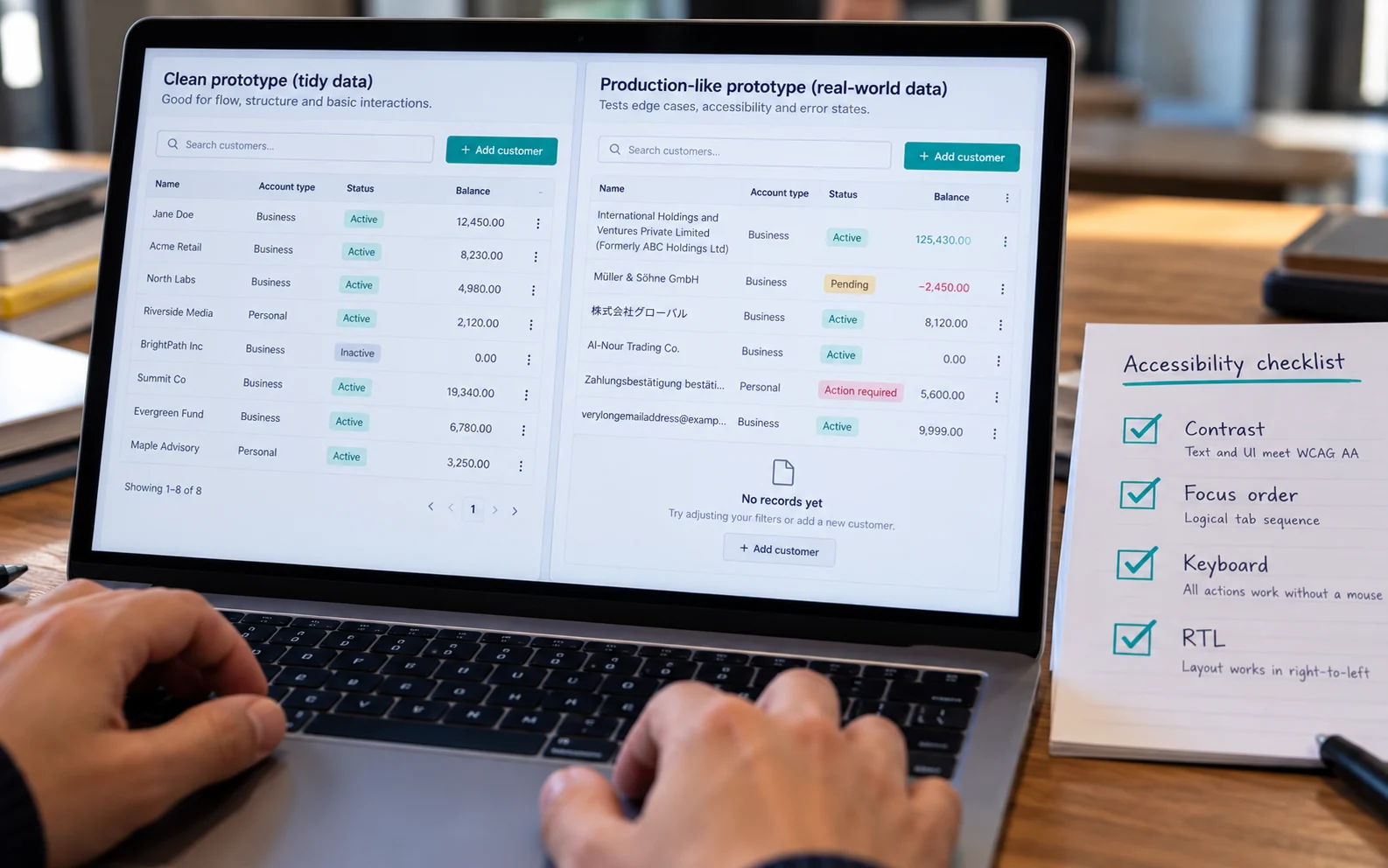
How do data-driven and accessible prototypes prevent post-launch surprises?
Data-driven and accessible prototypes prevent post-launch surprises by replacing optimistic placeholder content with production-grade edge-case records and verifying WCAG conformance before visual sign-off. Most prototypes fail in production because they were tested with a twelve-character customer name, eight tidy transaction rows, and an account balance that never goes negative.
When that layout meets real production data, German translations overflow buttons, a legal entity name wraps to three lines, and an undesigned empty state appears on day one. Connecting your prototype to a JSON fixture or staging API populated with ugly records exposes those fractures in hours rather than weeks. Because 94.8% of websites have at least one detectable accessibility failure—almost all of them invisible in static mockups—run these seven technical checks on every prototype:
1. Load realistic data sets: Test maximum-length strings, null values, negative figures, 400-row tables, and zero-record states.
2. Define every data-dependent state: Design explicit empty, loading, partial, and error states for every component.
3. Run screen-reader passes: Audit interactive prototypes to confirm logical focus order and ARIA labeling.
4. Verify contrast and keyboard navigation: Confirm WCAG color contrast and full keyboard-only operability before visual sign-off.
5. Apply pseudo-localization: Expose text expansion and truncation risks in non-English locales early.
6. Test RTL layout mirroring: Validate right-to-left spatial logic for Arabic and Hebrew markets if global rollout is planned.
7. Validate mobile user interface prototype design on real devices: Test how to prototype a mobile app against physical thumb zones, glare, and viewport constraints rather than idealized desktop monitors.
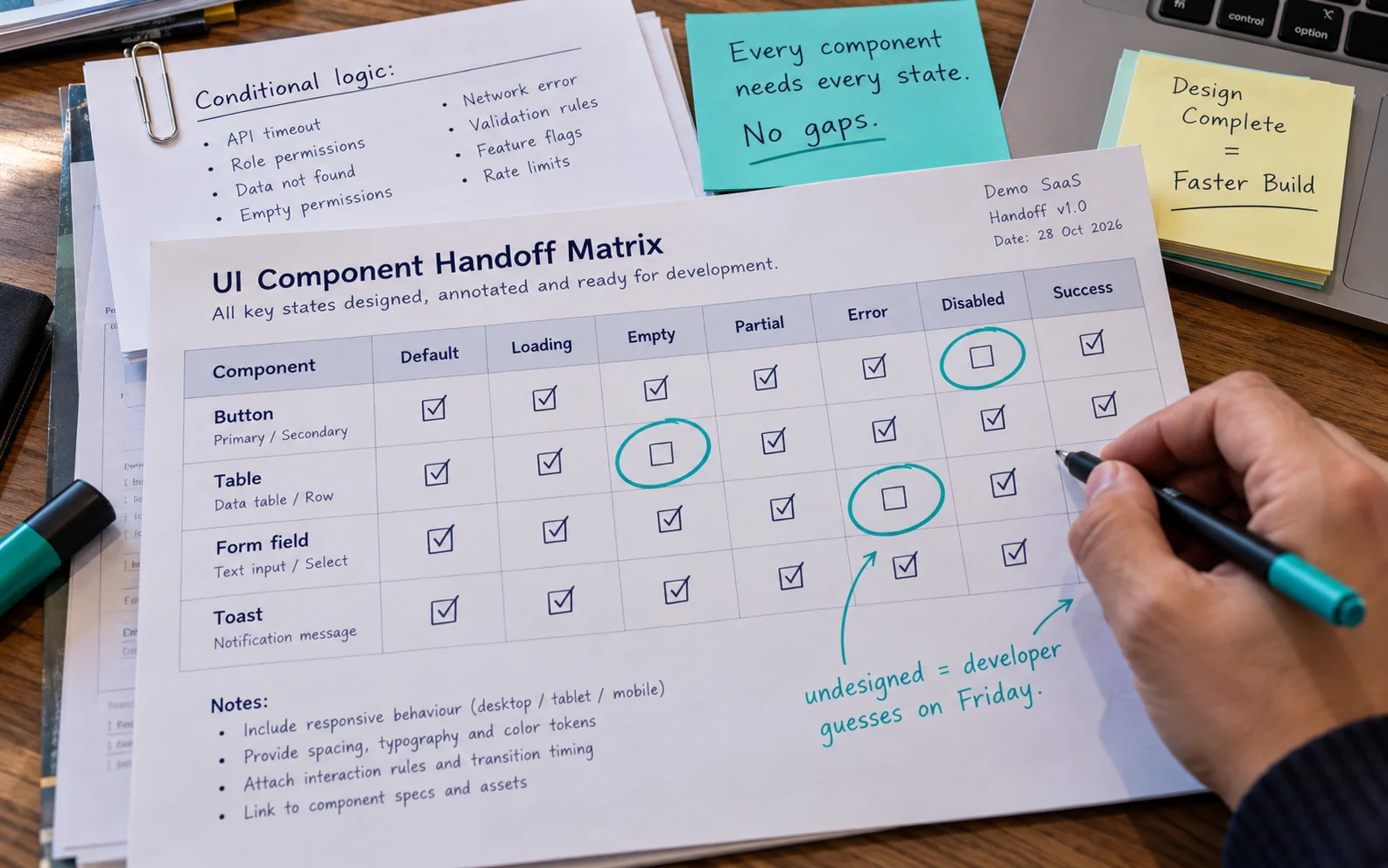
What does a clean UI design and prototyping handoff to engineering require?
A clean UI design and prototyping handoff requires a complete behavioral specification package so developers never have to improvise missing states or branching logic on a Friday afternoon. A validated prototype that gets misinterpreted during handoff produces the same outcome as no prototype at all, only with a longer paper trail.
- Build a handoff package, not a file link. Include interaction notes, redlines, spacing tokens, animation timing, and the research rationale behind non-obvious decisions so developers make informed judgment calls.
- Specify every state explicitly. Error, loading, empty, partial, disabled, and success states must exist in the prototype as designed artifacts.
- Document conditional logic separately. A clickable mockup shows one linear path. Write out the branching rules for API timeouts, role-based permission variances, and asynchronous field validations.
- Establish the prototype as the behavioral source of truth. When QA and engineering disagree about intended behavior, one validated artifact settles it. Tight validation and handoff loops explain why Lean UX approaches achieve strong usability and satisfaction outcomes, including PSSUQ scores of 2.136.
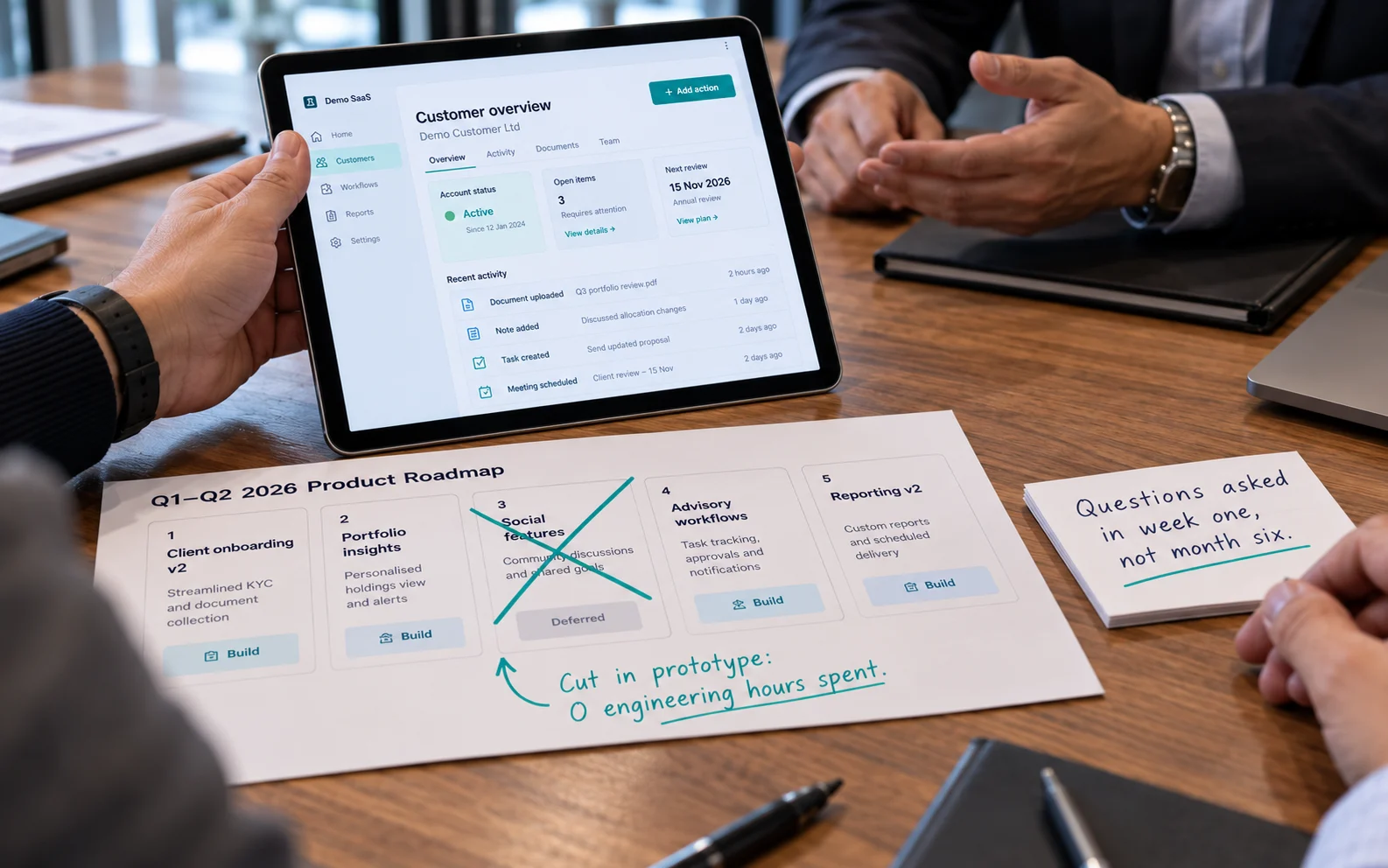
Why is rapid prototyping UX design a boardroom competitive advantage?
For executives weighing design investment against delivery velocity, rapid prototyping UX design condenses into four strategic advantages:
- Relocates failure to where it is cheap. Ideas that do not survive contact with real users die in a design file instead of a production release, avoiding architectural rework.
- Eliminates compliance and data-layout exposure early. In BFSI and healthcare, inaccessible interfaces and layouts that fracture under real data are regulatory and reputational liabilities, not cosmetic flaws.
- Prevents building elegant answers to unasked questions. Starting in the problem space ensures engineering only builds features tied to validated user and commercial needs.
- Compresses the domain learning curve. ScreenRoot’s 16+ years across regulated sectors means hard questions about approval chains, reconciliation logic, and operational edge cases get asked in week one rather than discovered in month six.
Frequently Asked Questions
What is UI UX prototyping?
UI UX prototyping is the process of creating an interactive, testable simulation of a digital product—ranging from low-fidelity wireframes to high-fidelity Figma flows or coded sandboxes—to validate user journeys, usability, and technical feasibility before writing production code.
How do you choose between a Figma prototype and a coded prototype?
Use high-fidelity Figma prototypes to test user comprehension, navigation flows, and visual hierarchy quickly. Use coded prototypes when validating complex state management, live data filtering, drag-and-drop interactions, or performance constraints that frame-based design tools cannot fake.
How do you prototype a mobile app for enterprise or regulated users?
Map all regulatory and authentication constraints first, populate the mobile user interface prototype design with realistic edge-case data, design all error and loading states, and test on physical mobile devices under realistic lighting, motion, and connectivity conditions.
Why should teams test accessibility and real data during UX prototyping?
Because 94.8% of live websites have detectable accessibility failures and idealized mock data hides text-wrapping and empty-state bugs, auditing WCAG compliance and JSON edge-case payloads during prototyping fixes defects in hours rather than weeks of post-launch refactoring.
What makes an effective prototype handoff to engineering?
An effective handoff delivers design tokens, animation timing, designed screens for all states (empty, loading, partial, error, disabled, success), written conditional branching rules, and research context, establishing the prototype as the single behavioral source of truth.
Future-proofing your 2026 product strategy with ScreenRoot
If your 2026 roadmap includes a platform rebuild, a new market entry, or a complex feature set in BFSI, healthcare, or manufacturing, validate the plan in a prototype before discovering its flaws in a production incident channel. Explore ScreenRoot’s work at screenroot.com/work/ and schedule a discovery and prototyping workshop with our team
Written by Team ScreenRoot. 16+ years leading enterprise UI/UX research for BFSI, SaaS, and Healthcare clients.
When you’re ready, let’s talk.
📞 Call us (Toll-Free): 1800 121 5955 (India)
✉️ Email us: [email protected]