1800 121 5955
In short: Design debt and engineering velocity aren’t opposing forces, they’re the same force pointed in different directions. CTOs who run design research a sprint ahead, work from shared component libraries, and measure UX in technical and business terms ship faster with fewer post-launch pivots. In regulated sectors, that discipline is a legal necessity, not a nicety.
Design debt and engineering velocity aren’t necessarily opposing forces, they’re the same force, pointed in different directions.
Every CTO has felt it: stakeholders want features shipped, the roadmap is already behind, and design reviews feel like speed bumps on the way to launch. The instinct is to compress UX cycles, treat visual polish as a luxury, and push engineers forward. It’s a logical call under pressure, and it’s exactly how you accumulate design debt, the UX equivalent of technical debt, that turns future sprints into slow, expensive rework.
Design debt isn’t just cosmetic. When interfaces are confusing, users abandon workflows, support tickets spike, and engineering teams get pulled back into cycles they thought were closed. Poor user-satisfaction metrics don’t stay in the analytics dashboard, they migrate straight into your next sprint’s backlog. What looked like a time-saving shortcut becomes a compounding liability.
The smarter reframe: UX isn’t an aesthetic layer added before launch. It’s a risk-mitigation strategy, and the broader evidence supports it. Research on design’s business value (notably from McKinsey) has repeatedly linked strong, design-led practices to better revenue growth and shareholder returns than industry peers. Reducing that risk starts well before a single line of code is written.
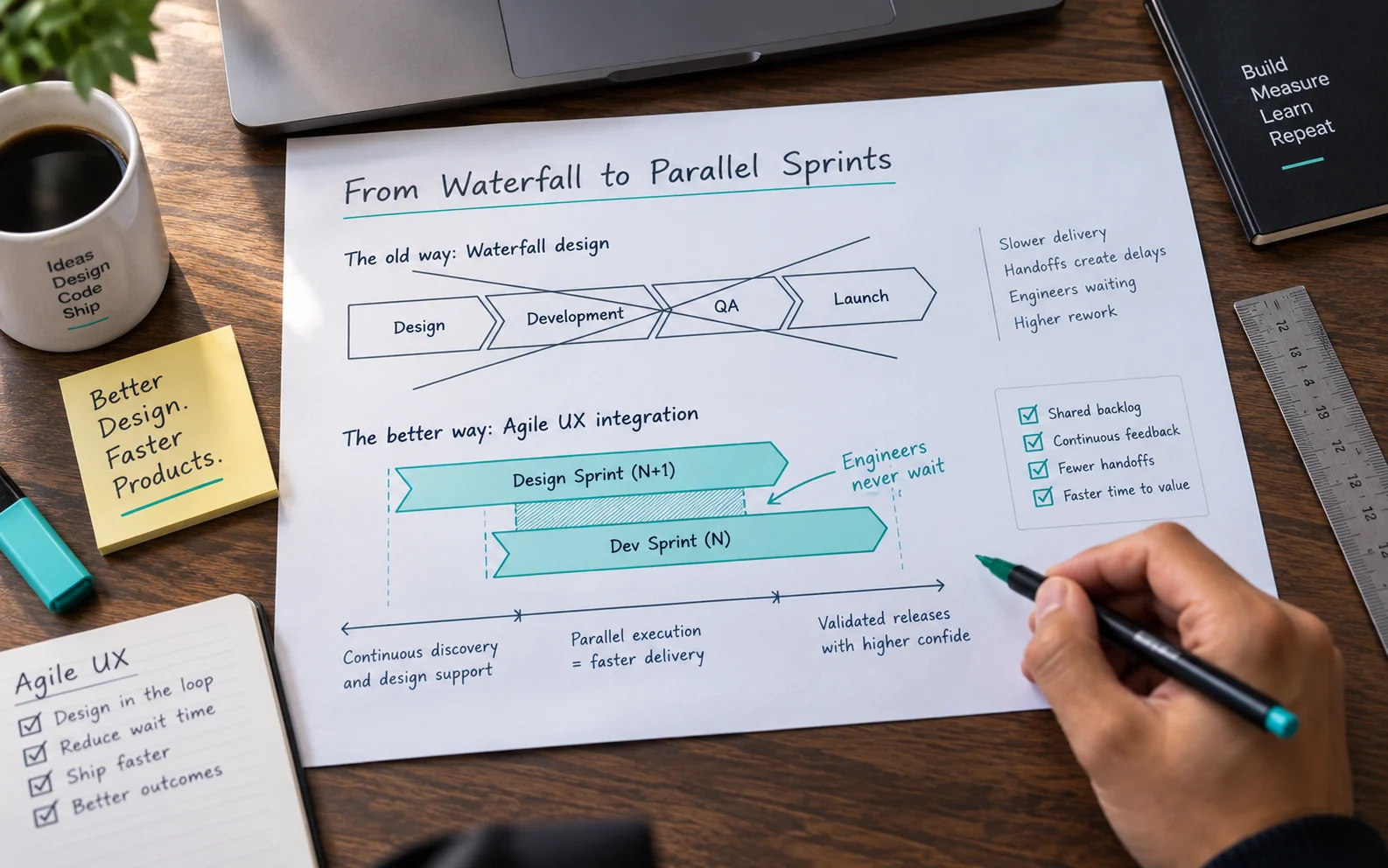
Agile UX Integration: Moving from Waterfall Design to Parallel Sprints
Agile UX integration for CTOs isn’t about bolting design onto a sprint retroactively; it’s about running design research one full sprint ahead of development so engineers never wait on decisions.
Design-ahead sprinting is the foundational shift. When the design team completes discovery, wireframes, and user validation before the engineering sprint begins, development starts with clear, tested requirements rather than evolving assumptions. In waterfall-style workflows, design hands off static mockups right as engineering needs to move. The parallel-sprint model breaks that bottleneck.
Shared component libraries are the second lever. A well-maintained design system, where every button, form element, and navigation pattern exists as a single source of truth – drastically reduces back-and-forth between designers and engineers. Friction drops when both teams work from identical building blocks. Decisions made upstream, with shared references, prevent costly interpretation gaps downstream.
Rapid prototyping closes the loop before code is written. Interactive prototypes let engineers flag technical constraints early while stakeholders validate flows against real business goals. That early validation isn’t a UX nicety; it’s a risk-management tool. Once these structural workflows are in place, the natural next question is how to measure whether they’re working.

Quantifying UX Impact Through Technical and Business Metrics
Boards don’t fund “better experiences” – they fund metrics, and UX delivers measurable gains across conversion, support costs, and product-development efficiency.
Moving beyond subjective “look and feel” arguments is the first step toward making UX a boardroom conversation. The most compelling evidence comes from hard output data. In ScreenRoot’s redesign work on high-volume ordering platforms, for example, success was measured through concrete indicators like conversion-rate improvements and reductions in order-completion time, exactly the language finance and operations stakeholders respond to.
The metrics that translate UX into business value include:
- Conversion-rate lift — percentage increase in users completing a target action post-redesign
- Order or task-completion time — reduction in the average time to finish a core workflow
- Support-ticket volume — fewer UI-related requests signal a more intuitive interface
- User-onboarding time — how quickly new users reach their first successful outcome
- Cognitive-load indicators — for example, tracking how many interactions it takes to complete a primary task
Each connects directly to engineering outcomes. Reduced onboarding time means fewer escalations to your dev team. Shorter task flows lower request frequency and infrastructure load. Track support-ticket reduction across sprint cycles and you’re effectively measuring how well design and engineering are collaborating in real time, a data point worth putting in front of your board.
These metrics matter even more when your product operates under regulatory constraints.

Navigating UX in Regulated Industries: BFSI and Healthcare Constraints
In regulated sectors like BFSI and Healthcare, digital-experience optimization isn’t a nice-to-have; it’s a technical and legal mandate that shapes every design decision a CTO makes.
Standard vs. regulated UX diverge sharply. A standard team optimizes for conversion, reduces friction, and ships fast. A regulated team must layer compliance requirements – HIPAA, PCI-DSS, ADA accessibility standards, into the design architecture before a single sprint begins. The cost of getting that wrong isn’t a dip in engagement metrics; it’s regulatory fines, litigation exposure, or patient harm. And workplace-software satisfaction remains stubbornly low in many organizations, which suggests compliance-heavy environments are struggling to balance security with seamless journeys. Locking data behind friction-heavy authentication protects the business but often alienates the very users you’re trying to serve.
Domain expertise separates a CTO who ships compliant products users adopt from one who ships compliant products users route around. In healthcare, a poorly designed intake form doesn’t just frustrate a patient, it creates documentation gaps that affect clinical outcomes. In BFSI, a clunky onboarding flow can drive abandonment that compliance teams never see on their dashboards. The regulated approach demands that accessibility, data privacy, and security are constraints baked into the wireframe stage, not retrofitted afterward. CTOs in these sectors need UX partners with deep domain fluency, not generalists learning the rules on the job. That same principle, building intelligence into the experience layer rather than bolting it on – is what makes AI integration such a high-stakes conversation.

Responsible AI Integration: The CTO’s New UX Frontier
AI is reshaping what users expect from digital products, and CTOs who embed responsible AI into an agile UX process will define the next generation of high-performing interfaces.
AI-driven personalization has moved well beyond recommendation engines. It can surface the right tools, suppress irrelevant menu options, and adapt layouts to behavioral patterns, reducing interface clutter before users notice it existed. Industry analysts (including Gartner) expect adaptive, AI-personalized experiences to become a growing share of workplace software in the coming years, signaling that this shift is structural, not experimental. For CTOs, that means designing systems where AI decisions actively simplify, not overwhelm the experience.
UI transparency is where responsible AI either earns trust or destroys it. When an interface changes dynamically, users need clear feedback: subtle indicators explaining why a menu item disappeared or a shortcut appeared. Without that transparency, even well-intentioned personalization reads as unpredictable, and unpredictability erodes confidence faster than a poor layout ever could.
The CTO’s ethical role sits at the intersection of capability and restraint. You can deploy powerful personalization models, but deploying them responsibly means setting guardrails – ensuring AI augments user decisions rather than steering them invisibly. That’s a governance call, not just a design call, and it belongs in the CTO’s remit from day one.

Case Study: High-Volume UX Optimization Under Load
When performance and user experience compete for priority, the product usually loses, unless your UX process is engineered to serve both at once.
The challenge in high-volume e-commerce isn’t just handling traffic spikes. It’s maintaining a seamless experience when thousands of users are ordering at once, across every device, with zero tolerance for friction. For any high-traffic ordering platform, where checkout abandonment has direct revenue consequences, even a half-second delay or a cluttered interface translates into measurable loss.
The technical constraint is familiar: responsive design that doesn’t sacrifice load speed. Serving optimized assets across mobile, tablet, and desktop while preserving visual consistency demands careful architectural decisions well before the first pixel ships. This is precisely where UX and engineering must operate as a single discipline, not parallel tracks.
In one such engagement, ScreenRoot reduced cognitive load at the checkout layer, streamlining the decision path so users move from selection to confirmation with minimal friction. The result was a technically sound implementation that balanced interface clarity with the performance demands of high-volume traffic, without forcing a trade-off between the two.
That balance between polish and performance points directly to a tension many CTOs recognize: the difference between cosmetic improvements and structural UX investment. And that distinction sits at the heart of what design debt actually costs a product team.

What Your CTO Wants You to Know About Design Debt
Design debt is the silent sprint killer, and most engineering teams don’t recognize it until it’s already slowing every release.
Polishing vs. improving. These aren’t the same thing, and conflating them is costly. Polishing makes an existing interface look cleaner. UX improvement validates whether the interface actually solves the right problem. Treat design debt like a visual cleanup task and you’re applying fresh paint to a structural problem.
The MVP trap. Skipping user research during the MVP phase feels efficient, until post-launch, when assumptions baked in early compound into rework that costs far more than the research would have. Investing in research-informed design isn’t a soft benefit; the broader evidence on design-led companies points to a measurable financial advantage.
Framing the ask. If you want UX resources approved, align the request to technical outcomes your CTO already cares about – reduced support tickets, lower usability-related bug rates, faster QA cycles. Don’t frame it as “better design.” Frame it as “fewer post-launch pivots.”
The strongest case for UX investment isn’t aesthetic; it’s architectural. Good UX prevents the kind of structural rework that derails roadmaps.
The Bottom Line: Accelerating Delivery Through UX
UX isn’t a bottleneck in your delivery pipeline; it’s the multiplier that determines whether everything downstream moves fast or grinds to a halt.
Teams that treat UX as an integrated technical discipline ship faster, hit fewer post-launch surprises, and spend less time firefighting regressions. The ones that bolt UX on at the end pay for it in rework and stalled roadmaps.
- UX is a technical accelerant. Resolving interaction problems before development compresses cycle time across the sprint.
- Research-first methodologies prevent costly pivots. Validating assumptions early is far cheaper than rebuilding features after launch.
- Conversion and efficiency metrics define success. Task completion, drop-off, and throughput keep UX accountable to business outcomes, not aesthetics.
- Regulated industries demand specialized expertise. Healthcare, fintech, and compliance-heavy verticals need practitioners who understand both the constraints and the speed pressure CTOs operate under.
The throughline is deliberate process. Good UX strategy doesn’t slow teams down, poorly integrated UX does.
Future-Proofing Your Digital Product Strategy
The CTO’s role has shifted from infrastructure guardian to experience architect, and the teams that recognize this earliest will define the next generation of digital products.
The most forward-thinking technical leaders aren’t just asking “can we build it?” They’re asking “will users adopt it, and will it scale without accumulating debt?” That dual accountability toward engineering rigor and user-centricity, separates products that compound in value from those that stall after launch.
Balancing speed with user-centricity isn’t a contradiction; it’s a discipline. Rushing delivery without research-backed decisions trades short-term velocity for long-term rework. Over-engineering the UX process creates its own drag. The answer is partnering with specialists who treat both as non-negotiable from day one. You’re not just buying design capacity; you’re buying fewer costly pivots down the road.
Frequently Asked Questions
What is design debt?
The UX equivalent of technical debt: the accumulated cost of shortcuts in interface and interaction design. It shows up later as abandoned workflows, support tickets, and rework that slows every future sprint.
How can UX speed up delivery instead of slowing it?
By running design research a sprint ahead of development, so engineers build against tested requirements, and by working from a shared component library so both teams use identical building blocks. Validation happens before code, not after.
How do you prove UX ROI to a board?
Translate it into metrics leaders already track: conversion-rate lift, task-completion time, support-ticket volume, onboarding time. Frame UX investment as “fewer post-launch pivots,” not “better design.”
Why does regulated-industry UX need specialists?
Because accessibility, data privacy, and security must be designed in at the wireframe stage, not retrofitted. Getting it wrong risks fines, litigation, or patient harm – stakes a generalist team learning on the job can’t safely carry.
Written by Team ScreenRoot. 16+ years leading enterprise UI/UX research for BFSI, SaaS, and Healthcare clients.
When you’re ready, let’s talk.
📞 Call us (Toll-Free): 1800 121 5955 (India)
✉️ Email us: [email protected]