1800 121 5955
Key Takeaways
- Micro-interactions are critical evidence layers that confirm system actions in high-stakes workflows.
- Pages loading beyond 2.5 seconds experience a 32% bounce rate increase (Google), making response feedback vital.
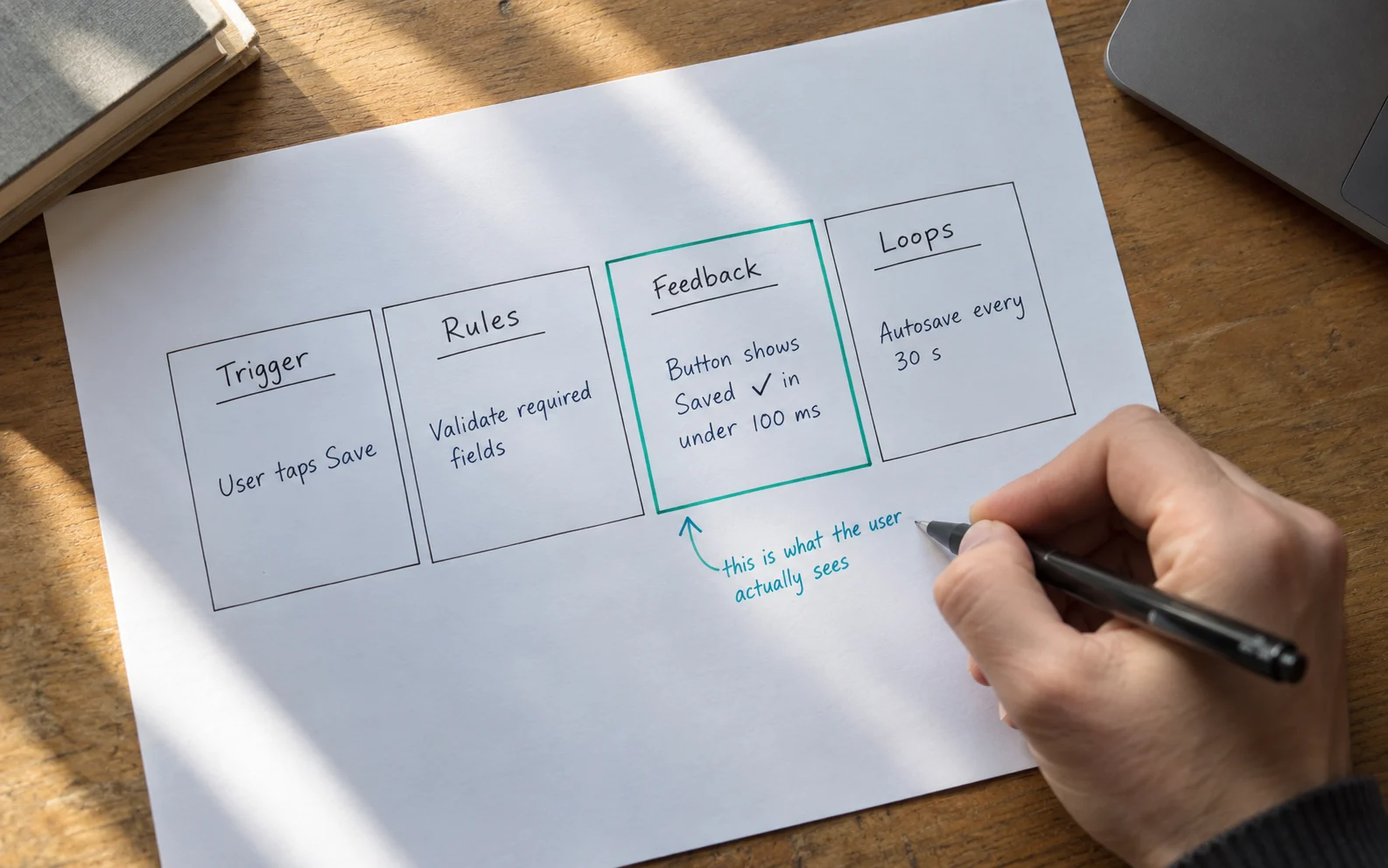
- Dan Saffer’s four-part model (Trigger, Rules, Feedback, Loops) structures effective interaction design.
- In regulated industries, functional feedback prevents costly double-submissions and downstream errors.
- Supporting accessibility settings like ‘prefers-reduced-motion’ is mandatory for enterprise software.

What is the Strategic Role of Interaction Design in UX?
Micro interactions in UX have become the consequential details that verify a system is working. Interaction design in UX defines how a system responds to human input. In regulated industries, micro-interactions are not decorative polish; they are the acknowledgment layer. A field that confirms a valid account number before submission prevents errors that cost millions of dollars to remediate.
Why Do Small Details Drive Enterprise Outcomes?
Small feedback moments reduce ambiguity. What are micro interactions? They are single-purpose events responding to user actions based on Dan Saffer’s four-part model: Trigger, Rules, Feedback, and Loops. Speed is inseparable from confidence. With pages loading beyond 2.5 seconds seeing a 32% increase in bounce rates, immediate visual state changes convert invisible system processes into human reassurance.

What Are Examples of Micro-Interactions in Regulated Industries?
High-stakes workflows benefit immensely from precise micro interactions UX examples:
- Banking: Staged progress indicators replace generic spinners during fraud screening, reducing duplicate payment submissions.
- Healthcare: Inline validation flags out-of-range clinical dosages instantly, preventing downstream patient safety issues.
- Compliance: Persistent step indicators guide users through KYC processes without overwhelming instructional copy.

What Are the Best Practices for Implementing Micro interactions in Web Design?
Enterprise micro interactions in web design prioritize precision over personality. Functional feedback must answer a user’s question; decorative motion is a cognitive tax. Design systems must enforce consistency across all modules. Furthermore, test interactions for the hundredth use—anything tedious after multiple repetitions should be simplified to static state changes.
How Do You Design Inclusive and Accessible Micro-Interactions?
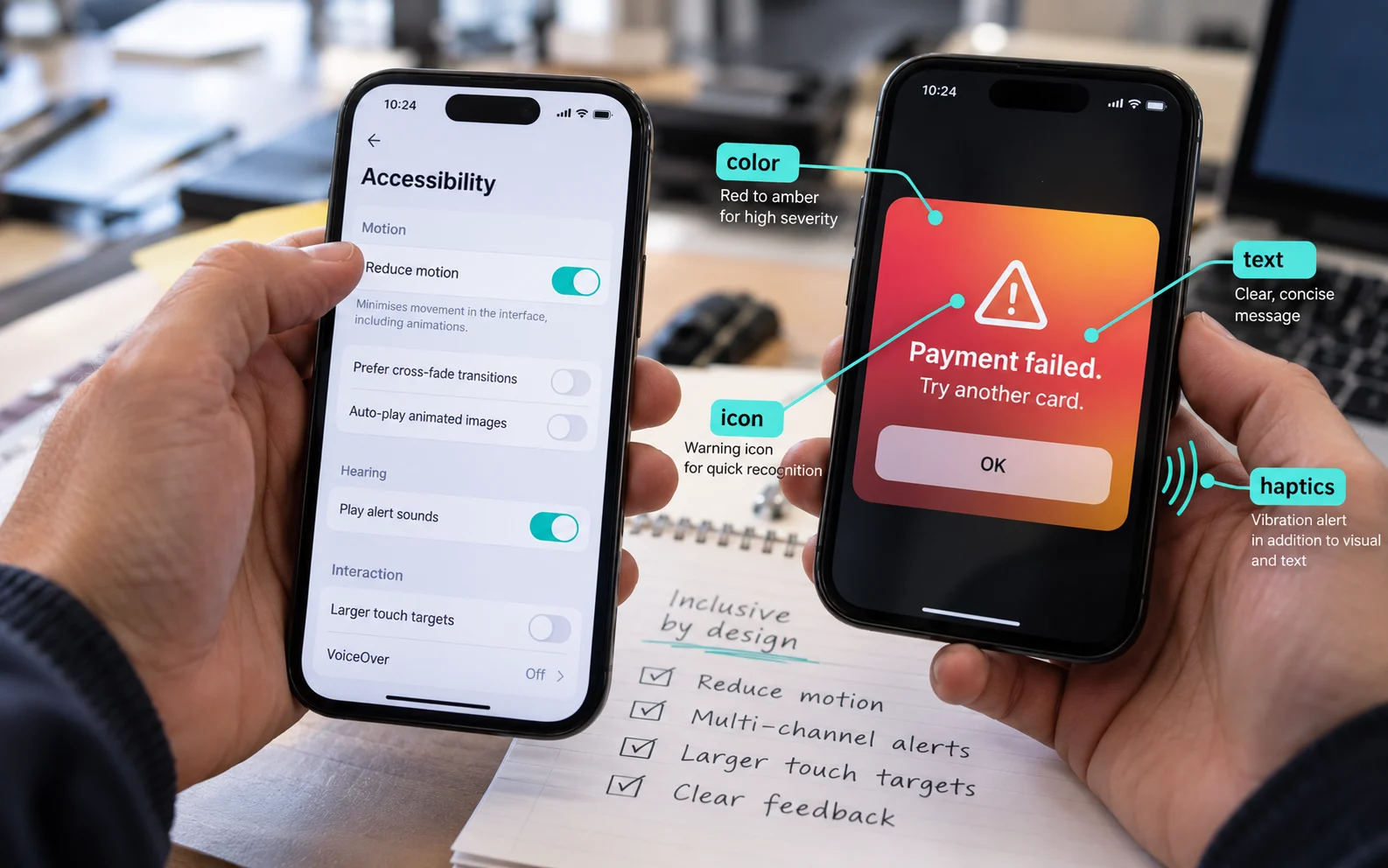
Motion is not neutral. For users with vestibular disorders, excessive animations trigger disorientation. Enterprise platforms must respect the prefers-reduced-motion media query, replacing sliding panels with instant swaps and clear text cues. Additionally, critical alerts must use multiple sensory channels (color shift, text, icon, and haptics) to ensure accessibility.
Frequently Asked Questions
What are micro interactions in UX?
Micro-interactions are single-purpose events within an interface that respond to user actions and provide immediate, focused feedback, such as a toggle shifting state or a field validating data.
What is interaction design in UX?
Interaction design is the discipline of defining how a digital system responds to human input over time, focusing on structure, feedback loops, and user flow.
Why are micro-interactions important for enterprise software?
In complex, regulated workflows, they provide necessary system acknowledgment, preventing costly user errors, reducing anxiety, and stopping duplicate submissions.
What are some micro interactions UX examples?
Examples include inline form validation for sensitive data, staged progress bars during secure financial transfers, and haptic confirmations on mobile devices.
Written by Team ScreenRoot. 16+ years leading enterprise UI/UX research for BFSI, SaaS, and Healthcare clients.
When you’re ready, let’s talk.
📞 Call us (Toll-Free): 1800 121 5955 (India)
✉️ Email us: [email protected]